Blog

  • June 10th to June 16th, 2024 – Updates to GNU Radio, Meshtastic SDR TX, and RFNM Software

    This week in DragonOS…

    Highlight of the Week: GNU Radio Updates for DragonOS are In Progress…

    Meshtastic SDR Adds Transmit Functionality…

    Recent Developments with the RFNM Board…

    Explore More with DragonOS…

    7/1/2024: Added YouTube link that covers Meshtastic transmit and receive functionality with a SDR

    Share this post:


    Highlight of the Week: GNU Radio Updates for DragonOS are In Progress

    DragonOS comes with 30 GNU Radio Out-of-Tree (OOT) modules ready-to-go out of the box, in addition to the Core blocks themselves. Take a look at the difference between a fresh install of GNU Radio on Ubuntu versus a fresh install of DragonOS

    One thing to note, however, is that DragonOS currently is packaged with GNU Radio Version 3.10.4 which was released in September 2022. GNU Radio has not released a new major or minor version since then, but their most recent release of 3.10.10 this past April comes with some improvements in functionality including:

    • upgrades to QT GUI (gtk front end will be deprecated in the future) which includes the ability to save some plots as images
    • some upgrades to gr-soapy
    • Python minimum version changed from 3.6.5 to 3.7.2 to support type hinting
    • text labels to specify types for block parameters, instead of background colors which were difficult to read and remember

    Here is the change log for just the 3.10.10 release: https://github.com/gnuradio/gnuradio/releases/tag/v3.10.10.0

    Thankfully, there has not been a minor version change since January 2022 with the release of v3.10.0. GNU Radio follows a slightly different development model than other software you might be familiar with, such as semantic versioning, because a minor version update is not always backwards compatible. You can read the philosophy of the GNU Radio developers on this topic here: https://wiki.gnuradio.org/index.php/GNU_Radio_3.8_OOT_Module_Porting_Guide#Development_Model

    The differences in minor versions, i.e. 3.9 and 3.10 or 3.8 and 3.10, is why it is hard to include all 3rd party OOTs in DragonOS. OOTs that GNU Radio supports can be found on their GitHub while all 3rd party OOTs are found here: https://www.cgran.org/. To further complicate things many apps in DragonOS are dependent on GNU Radio such as GQRX, QRadioLink, op25, and trunk-recorder. This means that with every GNU Radio update each of the OOTs and dependent apps must also be rebuilt. Thankfully, DragonOS makes it so that you don’t need to do this process yourself.

    For the DIYers, GNU Radio wiki also has some information about upgrading flow graph versions if you really find an old flow graph that you want to run on the updated version of GNU Radio in DragonOS: https://wiki.gnuradio.org/index.php?title=Porting_Existing_Flowgraphs_to_a_Newer_Version.

    DragonOS would like to thank the many awesome contributors of the GNU Radio Project for these updates. If you are interested in GNU Radio, they are hosting their annual conference in Knoxville, TN from September 16th to September 20th. You can buy tickets now through August 30th at the early bird rate of $450 before it increases in the days immediately before the conference. They also extended their call for proposals until July 8th if you are interested in contributing a talk, workshop, paper, poster, or lightning talk.


    Meshtastic SDR Adds Transmit Functionality

    While the changes from GNU Radio 3.10.4 to 3.10.10 alone were enough justification to upgrade, recent developments on Meshtastic SDR also motivated the version upgrade on DragonOS. Meshtastic SDR runs GNU Radio Version 3.10.9.2 and this past week the developer added transmit functionality. That was fast! Just last week we discussed successful receive experiments in DragonOS using Meshtastic SDR. Here is the commit with the addition of TX functionality on the US LongFast channel: https://gitlab.com/crankylinuxuser/meshtastic_sdr/-/commit/dffdef3d7dbc9dd97e1af5b97b14de2e64f1ff2d.

    If you enjoy the Meshtastic SDR project make sure to give the repository a star on GitLab so you can keep up with the developments that Josh is sure to add in the future.


    Recent Developments with the RFNM Board

    A couple of weeks ago, we mentioned the release of the RFNM board and promised future updates. The first of those updates is here. Where the first post focused on the RFNM hardware itself, this post addresses some of the software that can interface with the board. The main piece of software is librfnm, the host driver allowing your computer to recognize and communicate with the board: https://github.com/rfnm/librfnm

    Looking at this repository, the developer of Sniffle and developer of SDR++ are clearly interested in RFNM. To no surprise, SDR++  works well with the RFNM right now. You can see the recent commits and issues addressing further improvements with the RFNM board here:  https://github.com/AlexandreRouma/SDRPlusPlus.

    Cemaxecuter showed us on X just how well SDR++ works with the RFNM’s Lime Daughterboard. 122.8 MHz of instantaneous bandwidth is just a ridiculously high value for a consumer grade SDR: https://twitter.com/cemaxecuter/status/1801981663779438595

    In addition to a host driver, RFNM also released a driver that is compatible with soapy: https://github.com/rfnm/soapy-rfnm. An interesting application of the Soapy driver for the RFNM came from viperbjk on X. The post shows that GNU Radio can use this driver to dump captures from the 2.4GHz band into Wireshark, which then detected Bluetooth packets: https://twitter.com/viperbjk/status/1802009731327742114

    viperbjk doesn’t seem to have a GitHub repo with this project, but the picture makes it pretty clear how you could recreate this behavior if you have a RFNM lime daughter board.

    Lastly, since the RFNM has an ARM core, it is a perfect candidate for SDR4Space’s ARM release. Even though this release was originally intended for the Pi, there are only a couple of dependencies that require installation for SDR4Space to work on the RFNM board. One major difference between this approach and the approach with librfnm and soapy-rfnm is that the software runs native on the RFNM itself – no host required. However, the no host functionality required a small hack that tricked the RFNM to recognize itself via a USB cable connected to its own port in a loop. Check out the gist for this here: https://gist.github.com/inganault/054fe1ec482b63352db61d3925c76e49. The arm core doesn’t really stand a chance against processing 122.8 MHz of IQ capture, but it is still a cool example showcasing the capability of the RFNM board. The clunkiness of connecting a USB cable in a loop will likely be resolved by a RFNM firmware patch in the future, but it is an acceptable workaround for the time being. It is also possible that, if the application demands, a compute-intensive add-on board to the RFNM could enhance native processing on the RFNM. In applications where the ARM core can handle the IQ data streaming from the RF daughter board, it is convenient to operate in the absence of a connected host.


    Explore More with DragonOS…

    Share this post:

  • June 3rd to June 9th, 2024 – Meshtastic SDR, DragonTooth, and Artemis

    This week in DragonOS…

    Highlight of the Week: Meshtastic Receiver Implementation in GNU Radio…

    DragonTooth Addition to the WarDragon…

    Artemis Version 4 Released…

    Explore More with DragonOS…

    Share this post:


    Highlight of the Week: Meshtastic Receiver Implementation in GNU Radio

    Josh Conway, aka “crankylinuxuser”, aims to implement a full transceiver stack for a software defined radio (SDR) to enable it to act as a node on a Meshtastic radio network. Currently, the transmit functionality is still in development, but you can experiment with his receive capabilities by cloning his GitLab repository: https://gitlab.com/crankylinuxuser/meshtastic_sdr. Meshtastic uses LoRa at the physical layer, but it is important to note that Meshtastic’s network layer is not LoRaWAN. LoRaWAN is a specification maintained by the LoRa alliance. Meshtastic does not comply with this specification, you can read more about why its developers chose to diverge from the LoRaWAN standard and other facts about the frequencies, bandwidth, and power available on Meshtastic Networks here: https://meshtastic.org/docs/overview/. Lastly, Conway’s solution to implementing a full transceiver stack for Meshtastic on a SDR is not as trivial as connecting up a GNU Radio Source block to gr-lora_sdr: https://github.com/tapparelj/gr-lora_sdr. gr-lora_sdr is a dependency of the transceiver stack, but crankylinuxuser’s implementation builds a network decoder on the physical layer transceiver provided by gr-lora_sdr.
     
    Meshtastic_SDR can run on any SDR that is supported by the Soapy driver, which means if you have a HackRF, BladeRF, SDRPlay, PlutoSDR, Airspy, or RTLSDR you can try out this project. The benefit of implementing this transceiver on a SDR rather than a microcontroller connected to a LoRa chip, like the SX1262, is that you can look at multiple channels simultaneously. This includes each of the seven presets! Contrast this with a Meshtastic-specific device that is configured to operate on one channel at a time. This means, with enough processing power, you can:
    • Implement a sniffer to monitor for Meshtastic traffic near you
    • Create a node that siphons all preset channel traffic and feeds it into Meshtastic’s public MQTT server. Here’s a map of all nodes connected to this public server: https://map.technicallyrural.com/. 
    • Visualize and troubleshoot your Meshtastic-specific device without needing to purchase multiple devices
    As a final note, if you decide to run Meshtastic_SDR on DragonOS, be careful not to install the most recent version of protobuf with Python when testing out Meshtastic_SDR. Other applications, like Kismet, depend on older version of the protobuf that is already installed on DragonOS. Therefore to run this you should be within a virtual environment. Watch Cemaxecuter walk trhough this process in his recent video:

    DragonTooth Addition to the WarDragon

    Cemaxecuter is back at it again with the updates to the WarDragon. This last week he officially released a new listing of the WarDragon that includes the capability for RemoteID drone detection, aptly named “DragonTooth”, that was mentioned in the blog from last week and the week before. Check out the new listing: https://cemaxecuter.com/?product=wardragon-w-case.

    Among the various key features that Cemaxecuter lists on his website, special care was taken to ensure that interference from the addition of the DragonTooth would be limited. Cemaxecuter experimented with various internal layouts of the WarDragon and used a separate SDR to determine whether interference was present or not. In some misconfigurations, interference was noticeable in the 100 MHz range. If you purchase the newest edition of the WarDragon and want to make custom changes to the layout, keep this aspect in mind to save yourself from hours of troubleshooting.

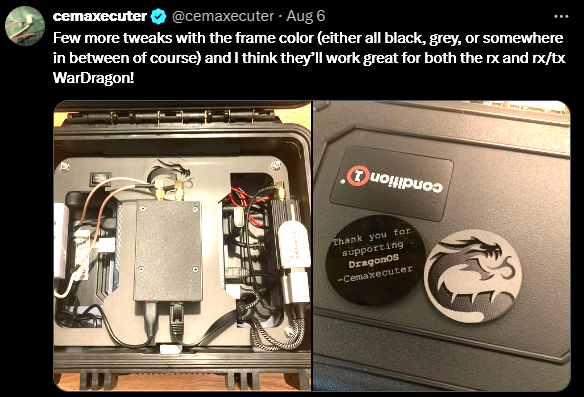
    Coming soon to the WarDragon, Cemaxecuter plans updates to the internal custom 3D printed framing. PETG plastic will be substituted for PLA to provide for greater temperature resistance, and some framing modifications will ensure that all peripheral components are seated in the optimal position to prevent components from jarring loose in rugged outdoor travel conditions.

    Artemis Version 4 Released

    Last week the developers behind Artemis, software for assisting “radio frequency (RF) signal identification and storage”, released version 4. Check it out here: https://aresvalley.github.io/Artemis/. It currently contains nearly 495 recognized signals and also provides some assistance for space weather tracking. You can review the full changelog between version 3.2.4 and their version 4 release, but the RTLSDR blog did a good job of summarizing recent improvements: https://www.rtl-sdr.com/tag/artemis/.
     
    After some troubleshooting with the developers, Artemis can run on DragonOS which means that its users will have the ability to search this offline database when trying to identify signals on the radio spectrum. Perhaps in the future, contributions will pair signals to the various tools that reside in DragonOS to enable quick analysis.
     
    If you want to try out Artemis on DragonOS, let us know whether or not it ends up working for you. Here are the steps that should allow you to run v4.0.3:
    ~$ git clone https://github.com/Aresvalley/Artemis.git
    ~$ cd Artemis
    ~/Artemis$ git checkout v4.0.3
    ~/Artemis$ sudo apt-get install libxcb-cursor0
    ~/Artemis$ python3 -m venv .venv
    ~/Artemis$ source .venv/bin/activate
    (venv) ~/Artemis$ pip3 install -r requirements.txt
    (venv) ~/Artemis$ python3 app.py 

    If successful, you should see the Artemis window below appear. To exit the Python virtual environment, simply enter the command deactivate in the terminal.


    Explore More with DragonOS…

    Share this post:

  • May 27th to June 2nd, 2024 – RF is Not Magic and More Fun with RemoteID

    This week in DragonOS…

    Highlight of the Week: Tinkering with the RF Not Magic Lime Daughterboard…

    Expanding Drone Detection Coverage Area with Mesh Networking…

    Explore More with DragonOS…

    Share this post:


    Highlight of the Week: Tinkering with the RF Not Magic Lime Daughterboard

    Talks of RF Not Magic (RFNM)  software-defined radios (SDR) began as early as March 2023, and after the tedious and detailed work of the RFNM team, customers received their boards this past week. Cemaxecuter was able to get hands on the RFNM Motherboard and Lime daughterboard. After testing the newly arrived boards with SigDigger and GNU Radio, the boards performed as well as their designers intended. Plan to see more detailed projects and videos with the RFNM Motherboard and Lime daughterboard soon.

    RFNM is taking a different approach to the consumer SDR market by separating the design of the SDR from the processing unit, such as a CPU or FPGA. This approach creates a modular and expandable interface that can be swapped based on each user’s desired application. Therefore, RFNM has three important components within its ecosystem: the motherboard, the daughterboards, and the interface.

    The RFNM motherboard has an ADC/DAC for converting between analog and digital signals, a timing chip, CPU, e-SIM, and RF switching logic. The motherboard exposes all of these components to its connected daughterboards which can implement an SDR, signal generator, oscilloscope, or any other desired application that relies on this fundamental set of integrated circuits.

    Daughterboards are independent of one another and provide specific functionality that the end-user requires. Currently, RFNM supports two daughterboards: The Lime and The Granita. RFNM plans to design more daughterboards in the future, and if you are an ambitious RF PCB designer, you can develop custom daughterboards. RFNM provides a template board as a starting point, but you must join their Discord to download the files from the board-design-rf112 channel. As for the Granita, it boasts an impressive 10-7200 MHz operational range with two SMA ports that can simultaneously receive. Alternatively, one port can receive and the other can transmit. Cemaxecuter owns the Lime daughterboard which covers 1-3500 MHz with only one SMA port available for either transmit or receive.

    The RFNM interface connects the motherboard to the daughterboards. There are two interface slots on the RFNM motherboard: the primary and secondary. It is not immediately clear whether users can connect multiple application daughterboards to the motherboard simultaneously; however, the purpose of the primary interface is to offer higher performance to the daughterboard while the secondary interface offers display and other ancillary features.

    Orders for new RFNM boards are closed as the developers focus on delivering to their current backers. The developers will open up pre-orders again as long as the hardware is in high demand. At that point, a new manufacturing batch can take place and boards could be delivered in as little as 2-3 months. The easiest way to signal demand is to sign up for RFNM’s newsletter on their website and engage RFNM on Twitter and Discord. When the pre-ordering window does open back up, users must purchase an RFNM motherboard for $299 and buy any combination of the Lime ($179) or Granita ($249) daughterboards. A breakout board is also available for $29, but the main purpose of this add-on will be for testing.

    RFNM Website: https://rfnm.io/

    RFNM twitter: https://twitter.com/rfnotmagic

    RFNM GitHub: https://github.com/rfnm


    Expanding Drone Detection Coverage Area with Mesh Networking

    After boasting a 772m RemoteID decode two weeks ago, Cemaxecuter wanted to continue to expand the applicability of decoding these packets in real time. The idea for increasing the applicability of RemoteID decoding is to create a network of nodes that can collectively decode RemoteID packets for a larger coverage area. The first step in this direction involved sharing Bluetooth packets decoded by Sniffle over a HaLow mesh network. The simple test last week involved two Alfa HaLow-U nodes. One node was connected to a base station and the second node was connected to a WarDragon 400m away from the base station. The WarDragon contained a SONOFF CC2652P to decode RemoteID packets and send the decoded packet to the WarDragon over HaLow.

    The base station was able to receive decoded RemoteID packets and unpack position information about the drone, as expected. During the test, Cemaxecuter reached a new max distance at which the WarDragon decoded RemoteID: 1000 meters! This means the total separation between the base station and the drone was 1400 meters, almost 1 mile.

    The current workaround to share RemoteID packets over the network requires running Sniffle via the command line and then using Netcat to pipe Sniffle’s output file across the network. The “To-Do” for the future involves real-time mapping support so that multiple WarDragons can feed a single map on the base station.

    Rokland Alfa HaLow-U Documentation and Support: https://store.rokland.com/pages/alfa-halow-u-tube-ah-802-11ah-support-page


    Explore More with DragonOS

    Share this post:

  • May 20th to May 26th, 2024 – Welcome Post

    This week in DragonOS…

    Highlight of the Week: DragonOS Tests Support for RemoteID Decoding…

    Using YateBTS on a BladeRF to Place International Calls…

    Pull Request Makes Improvements to SigDigger’s Panoscope…

    Airspy Promises Release of a New SDR Dubbed “Ranger”…


    Welcome to the first post of the DragonOS blog. Since its origin in 2019, DragonOS has aimed to deliver valuable and accessible tools to those who use softhttps://cemaxecuter.com/?p=320#ib-toc-anchor-1ware-defined radio (SDR) radios. The creator, Cemaxecuter, hopes DragonOS will become the go-to resource for SDR just as Kali Linux is a one-stop-shop for the offensive security and digital forensics fields.

    This blog adds to the extensive resources that DragonOS provides by publishing weekly content covering the latest developments in the SDR world and their impact on DragonOS. If you are not already familiar, below are links to all of the sites where you can currently engage with DragonOS:

    Share this post:


    Highlight of the Week: DragonOS tests support for RemoteID Decoding…

    Drones are everywhere. They present dazzling light shows at concerts, provide engaging cinematography shots, and have many functional uses in construction, farming, and medicine. Unfortunately, drones can also present significant personal safety risks at home, airports, and even the battlefield. To deter malicious and negligent behavior with drones the FAA mandated all drone operations outside of FAA Recognized Identification Areas (FRIAs) must have Remote ID. Read more about the background and rules here: https://www.faa.gov/uas/getting_started/remote_id.

    DragonOS tested Remote ID packet broadcast decoding this week and proved the ability for detection and decoding 772m away using a standard 3 dBi omnidirectional stub antenna. The Remote ID transmitter used during the test was Holy Stone’s Drone Remote ID module. DragonOS tunes into these broadcasts using off-the-shelf hardware from ElectronicCats combined with Sniffle software and a Wireshark dissector to decode a drone’s serial number, GPS position, velocity, and GPS position of the ground station. This means that DragonOS will be able to provide its users with real-time situational updates for any drones with Remote ID in nearly a half-mile radius, which is well beyond the range at which anyone could normally see or hear a drone.

    RemoteID Detection is coming to the WarDragon soon: https://cemaxecuter.com/?product=dragontooth-remote-id-receiver-kit

    Watch Cemaxecuter demonstrate this capability on YouTube:


    Using YateBTS on a BladeRF to Place International Calls…

    Capabilities-wise 2G cellular technology is nowhere close to competing with modern 5G implementations, but there are still areas of the world that rely on 2G for communication. YateBTS runs in DragonOS and can emulate a base transceiver station (BTS) on either the BladeRF xA4 or xA9. This week, Cemaxecuter used his BladeRF xA9 as a BTS to make a 6-minute call from a Samsung S4 end-user device (EUD) in the United States to South Africa and Australia. The recent development came thanks to making the switch from session initiation protocol (SIP) to inter-asterisk exchange (IAX) service using DiamondcardUS as the backend service.

    Pretty much all US 2G service is gone, but the functionality of YateBTS allows for the BladeRF to act as a BTS and relay a connection from a compatible EUD to DiamondcardUS for international routing. This adds yet another feature to DragonOS that could come in handy. In one of his recent videos, Cemaxecuter was able to join a conference call between himself in Georgia, Rob from Nuand in California, and Rob VK8FOES in Australia. There are some limitations where external users cannot yet dial the EUD on the BladeRF BTS and the BTS cannot directly call cell phone numbers within the US, but it is possible Cemaxecuter could resolve these bugs in the future.

    Watch Cemaxecuter use YateBTS on YouTube:

    Part 1 – Setting up YateBTS
    Part 2: Making a Group Call with YateBTS

    Pull Request Makes Improvements to SigDigger’s Panoscope…

    SigDigger is a popular signal analyzer that runs in DragonOS. Pending updates to the panoramic spectrum view feature will allow for seamless spectrum scanning. Thanks to some open-source contributions from sultanqsim the panoramic spectrum feature no longer experiences random lags and unresponsiveness. It’s a bonus for quick spectrum analysis without the headache.

    See the pull request here: https://github.com/BatchDrake/SigDigger/pull/245


    Airspy Promises Release of a New SDR Dubbed “Ranger”…

    The Airspy developers are teasing the release of their “Ranger” SDR claiming that it will be an improvement on their HF+ Discovery. Reviewing their specifications, it seems that the Ranger will combine the performance of the HF+ Discovery, R2, and SpyVerter to enable a scan range from 0.5 kHz to 1.75 GHz, a sample rate of 36 MSPS, and -140 dBm sensitivity. This will allow users to view a wider portion of the spectrum than both the R2 and HF+ Discovery without sacrificing the ability to analyze weak signals in all available bands. While it is feasible for users to connect a SpyVerter to the R2 to extend range into the HF band, this extension sacrifices frequency range for sensitivity and adds some connection loss. AirSpy does not advertise the cost of the Ranger, but the HF+ Discovery costs $169 so you should assume it will cost at least as much. Based on their other offerings, it is not likely that the SDR will cost more than $400 given the HF+ Discovery and R2 contain many of the same components.

    The Airspy R2 is currently the core default SDR within the WarDragon. For those who are not aware, the WarDragon is the hardware extension to DragonOS’ stellar software suite. Where DragonOS itself makes SDR tools easy to use and access, the WarDragon gives you the hardware you need to play with these tools right away. Cemaxecuter has been pouring improvements into the platform since the first one was sold in early 2024. After selling over 20 WarDragons, his contributions are still going strong. If the Ranger truly expands the available frequency range at no cost to performance, it would be a good opportunity to expand the WarDragon’s frequency range down into the HF band.

    Airspy’s Ranger product page is here: https://airspy.com/airspy-ranger/


    Share this post: